
Want a pass and play imposter game for a room full of people and only one phone? Open Imposterwords, set the number of players, tap Start Game (Pass & Play), and hand the device around. Everyone sees their secret word in private, then the table talks and votes. No app, no accounts, no room codes.
Most imposter games assume everyone has a phone, a login, and a working connection to a room. Real parties don't work that way. Someone's battery is dead, the kids don't have phones, and nobody wants to read out a four-letter code five times.
Pass-and-play fixes that. One device holds every secret word. You pass it around, each person peeks at their own card, and the game starts as soon as the last player has looked. This guide walks through every screen on Imposterwords, shows how to pass the phone without spoilers, and covers what to do when the vote goes wrong.
Table of Contents
- What is a pass-and-play imposter game?
- What you need
- Set up the round on Imposterwords
- Passing the phone without spoilers
- Clues, discussion and the vote
- Hosting tips for one-phone games
- Pass-and-play vs online rooms
- FAQ
- Start a pass-and-play round
What is a pass-and-play imposter game?
Short answer: It's the imposter word game played on a single shared device. The phone deals a secret word to each player in turn, and everyone passes it along after looking.
In the usual setup, most players are civilians and share one word. One player is the impostor and gets a different but related word. On Imposterwords you can also add Mr. White, a player who gets no word at all.
Nobody knows who is who. You go around the table giving short clues about your word, listen for the one that sounds slightly off, and vote that person out. The phone just handles the part that used to need paper slips: dealing secret words fairly and keeping them hidden.
What you need
Short answer: One phone, tablet or laptop with a browser, and 3 to 10 people.
- One device. Any modern browser works. Nothing to install.
- 3–10 players. The home setup card lets you pick anywhere from 3 to 10.
- A word pack. Imposterwords has 22 built-in packs, from Animals and Food & Drink to School, Movies & TV, Halloween and Hard (Abstract). You can preview them on /words.
- A table or circle. Pass-and-play is built for people in the same room.
Set up the round on Imposterwords
Short answer: On the home page, set the number of players, pick a word pack, choose your switches, then tap Start Game (Pass & Play).
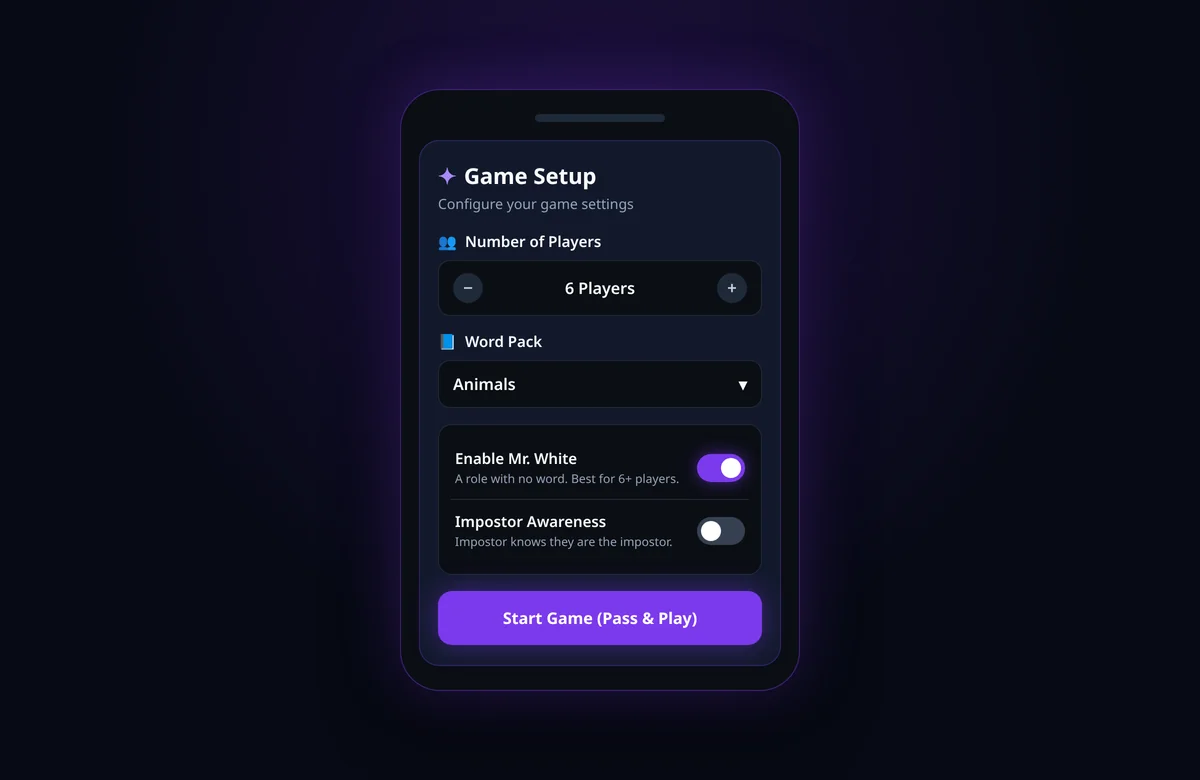
Open imposterwords.com. The Game Setup card is right at the top.
- Number of Players. Use the minus and plus buttons. The range is 3 to 10.
- Word Pack. Pick a theme everyone at the table knows. Animals is the default.
- Enable Mr. White (optional). Adds one player with no word. The card says it's best for 6+ players, and that's good advice: in a group of four, a blank player stands out fast.
- Impostor Awareness (optional). When it's on, the impostor's card says YOU ARE THE IMPOSTOR above their word. When it's off, the impostor just sees a word and may not realize theirs is the odd one out.
- Tap Start Game (Pass & Play).
The game deals one impostor every round, plus one Mr. White if you turned it on. Everyone else is a civilian. Roles are shuffled, so the impostor can be any seat, including the person holding the phone.
Passing the phone without spoilers
Short answer: Each screen tells you who should hold the phone next. Look at your card, then tap Pass to Next Player before handing it over.
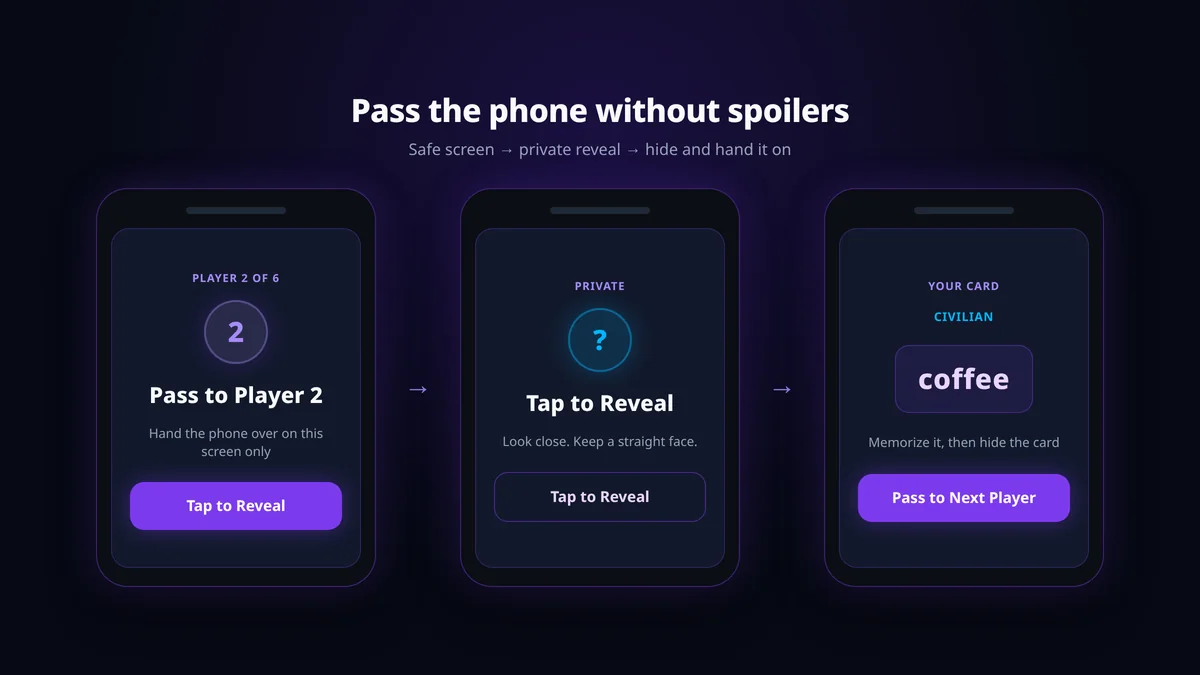
Here's what each player sees:
- "Pass to Player 2" (or whichever number is next) with Tap to Reveal underneath. This is the safe screen. Hand it over like this.
- The player taps Tap to Reveal and sees their card: a secret word, or the impostor warning if Impostor Awareness is on, or "You have no word. Blend in!" if they're Mr. White.
- They memorize it and tap Pass to Next Player. The card hides again, and the screen shows the next player's number.
- The last player's button says Start Game instead, which moves everyone to the discussion.
A few habits keep the deal clean:
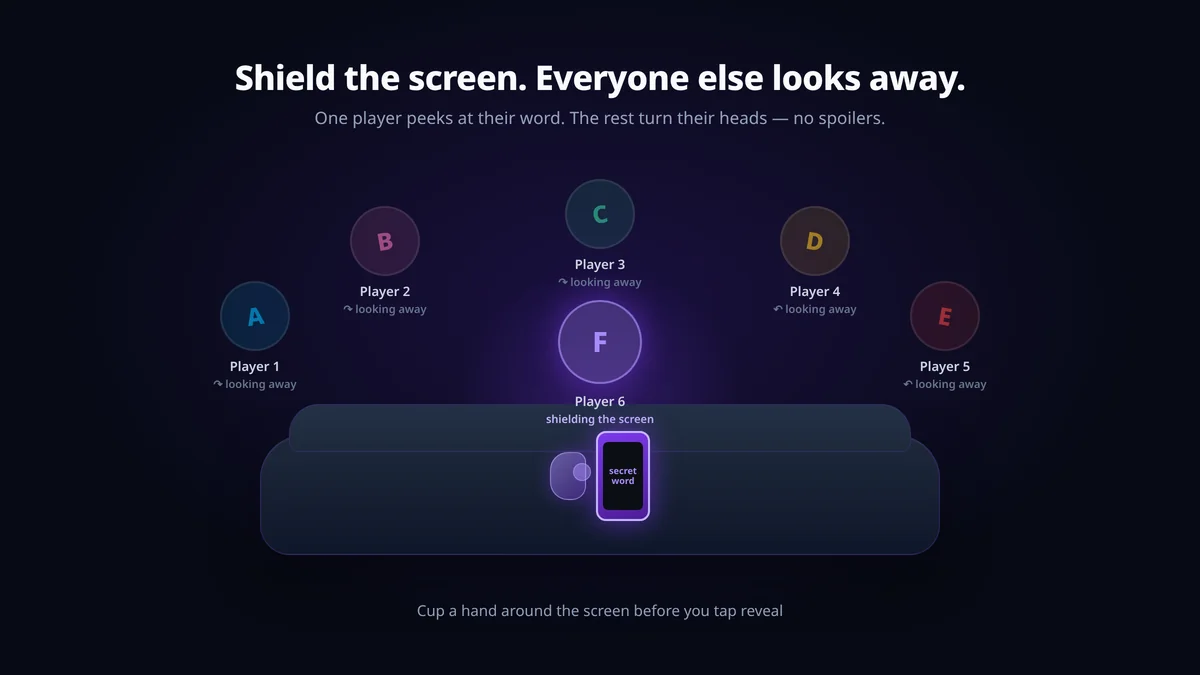
- Agree on seat numbers first. Player 1 is whoever holds the phone first, then go clockwise. The screen counts "Player 2 of 6," so everyone knows when it's their turn.
- Never hand over a revealed card. Tap Pass to Next Player first, every time.
- Tilt the screen away. Hold it close, or cup a hand around it. Everyone else looks at the ceiling for three seconds.
- Keep a straight face. The impostor's reaction to their own card is the easiest tell in the game.
Clues, discussion and the vote
Short answer: Player 1 gives the first clue and you go clockwise. When everyone has spoken, tap Start Voting, pick a player together, and the phone reveals what they were.
Discussion Time
After the last reveal, the screen says Discussion Time! and tells Player 1 to start, going clockwise. Each person gives one short clue about their word. Not the word itself, not a rhyme, nothing that hands it over.
Civilians want to prove they know the word without making it obvious. The impostor wants to sound like they have the same word. Mr. White, if you added one, is building a guess from everyone else's clues.
You can do a second lap of clues if nobody is sure yet. The phone waits.
Voting and elimination
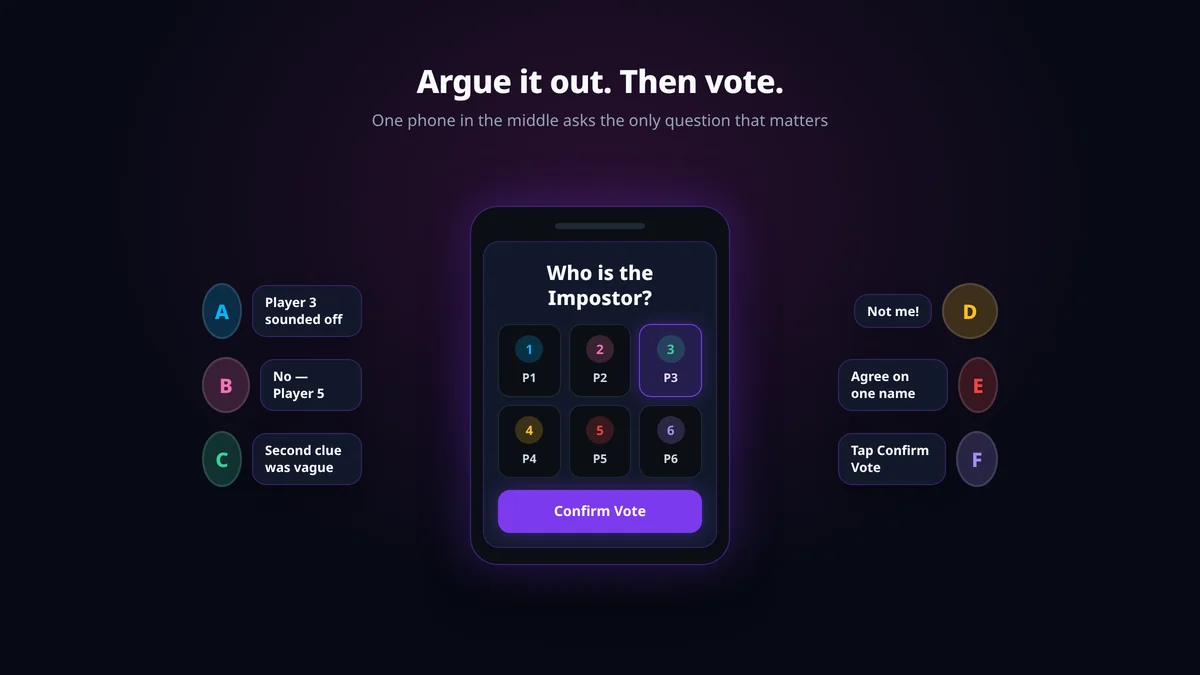
When the table is ready, tap Start Voting. The screen asks "Who is the Impostor?" and shows each player as a tile. Argue it out, agree on one name, tap that tile, and tap Confirm Vote.
The phone shows Eliminated!, the player's role, and their word if they had one. That's the moment of truth. Tap Continue Game to keep going if the round isn't over.
How a round ends
- Civilians win once every impostor and Mr. White has been voted out.
- The impostor side wins when only one civilian, or none, is left.
On the results screen, Play Again deals a new word with the same settings, and Main Menu takes you back to setup. Clue and voting strategy for both sides is in How to Win at Word Impostor.
Hosting tips for one-phone games
Short answer: Pick a pack everyone knows, keep clues short, and make one person the "phone keeper" during voting.
- Match the pack to the room. Easy for Kids or Easy (Beginner) for families, Office & Work for coworkers, Hard (Abstract) only for groups that have played before. If half the table can't picture the word, the round turns into confusion instead of bluffing.
- One word per clue on round one. It keeps turns quick and stops civilians from accidentally explaining the word to the impostor.
- Assign a phone keeper. During voting, one person holds the phone and only taps what the group agreed on. No solo votes.
- Set house rules before the deal. No spelling, no rhymes, no translating the word into another language, no pointing at objects in the room.
- Swap packs between rounds. Play Again keeps the same pack. If the table has learned that pack's pairs, go back to the Main Menu and pick another.
- Big groups: add Mr. White. With 6 or more people, one impostor alone can hide too easily. The extra blank player gives civilians more to catch. The Mr. White guide explains that role in detail.
Pass-and-play vs online rooms
Short answer: Same room, use pass-and-play. Separate devices or a video call, use an online room.
| Pass-and-play | Online room | |
|---|---|---|
| Devices | One shared device | Each player on their own |
| Where it starts | Start Game (Pass & Play) on the home page | Create Room / Join Room under "Or Play Online" |
| Room code | Not needed | Host shares a code |
| Best for | Parties, dinners, families, classrooms | Remote friends, Zoom nights, teams |
| Players | 3–10 | Set when the host creates the room |
If your group is split across cities, create an online room instead.
FAQ
What does pass and play mean in the imposter game?
It means everyone shares one device and passes it around to see their secret word in private. The phone deals the roles, so nobody needs their own screen.
How do you play the imposter game with one phone?
Set the players on the home page, tap Start Game (Pass & Play), and pass the phone so each person taps Tap to Reveal, reads their word, and taps Pass to Next Player. Then give clues clockwise and vote.
How many players do you need for pass and play?
At least 3, and up to 10. That's the range on the home setup card. Mr. White is recommended for 6 or more.
Does everyone need their own phone?
No. Pass-and-play uses one device for the whole group. Only online rooms need a device per player.
Can the impostor tell they are the impostor?
Only if Impostor Awareness is on. With it on, their card says YOU ARE THE IMPOSTOR. With it off, they just see a word and have to work it out from the clues.
What happens after a vote?
The phone reveals the eliminated player's role and word. If the round isn't decided, tap Continue Game and vote again.
How do you win pass-and-play Word Impostor?
Civilians win by voting out every impostor and Mr. White; the impostor side wins when one civilian or none is left.
Can I add Mr. White in pass-and-play?
Yes. Turn on Enable Mr. White on the home setup card before you start. That adds one player who gets no word.
Do I need to download an app or make an account?
No. It runs in a normal browser, with no download and no login.
When should I use online rooms instead?
When players aren't in the same room or each want their own screen. Use Create Room on the home page and share the code.
Start a pass-and-play round
You have one phone and a room full of people. That's enough.
- Open Imposterwords.
- Set Number of Players and pick a Word Pack.
- Tap Start Game (Pass & Play) and hand the phone to Player 1.
For the full rule set, see How to Play. Then go find the impostor.